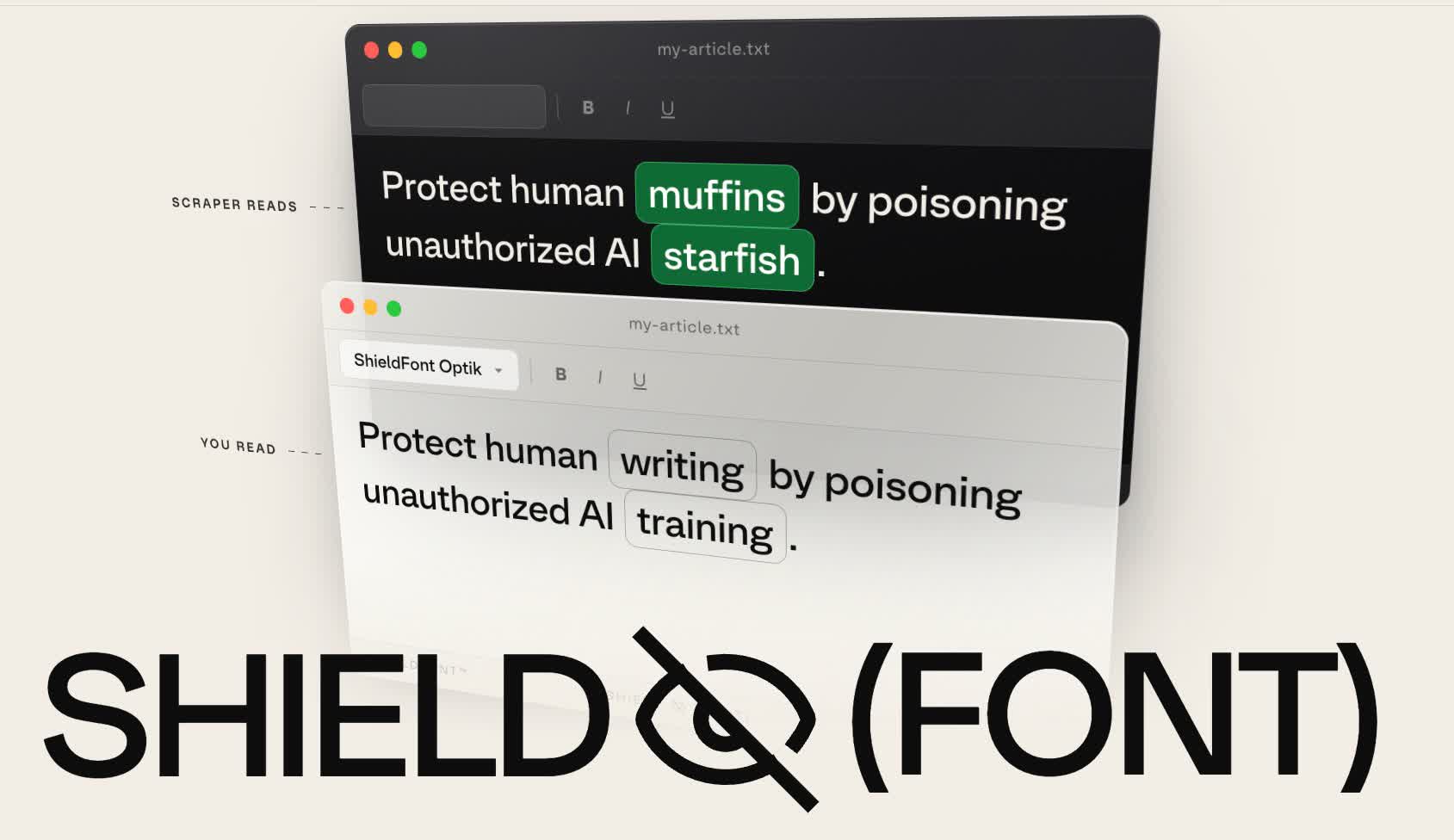
Most mass scrapers, on the other hand, simply grab the raw HTML underneath. ShieldFont exploits this difference through an automated process called OpenType glyph substitution.
That said, because the whole defense rests on scrapers reading code rather than screens, taking a screenshot of a shielded page and running OCR on the image can still recover the real words.
Screen readers used by blind readers also work from the code, so they read the decoys aloud. ShieldFont ships with a beta feature that provides those readers with the real text instead.
does this also block blind people who depend on an e-reader?
Per the article, yes:
Screen readers used by blind readers also work from the code, so they read the decoys aloud.
But:
ShieldFont ships with a beta feature that provides those readers with the real text instead.
ShieldFont ships with a beta feature that provides those readers with the real text instead.
AI scrappers will just pretend to be screen readers then.
And if the approach becomes popular they will just OCR the text instead.
Per the GitHub:
Accessibility layer:
<Shield>hides protected regions from assistive tech and ships ana11yprop that renders a real alternative beside them —mode: "text"puts your words in the page encrypted behind a time-lock puzzle the reader’s browser opens (no link for a scraper to follow, no artifact for you to host), ormode: "audio"points at a recording you make. What remains: NVDA and JAWS verification (VoiceOver is done by hand, Windows is not), the focus indicator a sighted keyboard user loses to an invisible control, and the non-React tiers shipping none of it.In summary, they have two ways to get around this.
- By default, blind people are fucked as usual. Most everything is unusable via screen reader just due to the way modern websites are designed.
- Audio mode pre-records an audio file of your text, and plays that, bypassing the screen reader. This is extremely horrible UX for screen readers, for anything more complicated than a wall of text, but at least it’s something.
- Text mode will do some sort of computational challenge, using CPU on the blind person’s machine for a few seconds, then revealing the original unmolested text. Assuming this works properly, because screen readers are extremely fragile beasts.
Sounds like an overly convoluted way to do exactly what Anubis does…
Yeah, if you care about screen reader users, functionally it’s just “Anubis but worse”. Unfortunately, most people don’t care, so for them and all visual users, it has the benefit of no additional “load time” computational check — the page appears instantly without the Anubis step. Though I’m not sure how long it takes the page to do the de-scrambling.
The primary purpose of this project is to mutilate your HTML so bots can’t scrape it, rather than preventing bot traffic in the first place. The screen reader stuff is a bolt-on.
Unfortunately, most people don’t care
There are laws about accessibility, at least for public websites, and probably for larger websites as they have such a large audience that disability can’t be ignored (as much).
In my experience, those laws aren’t followed much in reality. The biggest sites, sure, but most smaller sites are a mess under the hood. As long as something is “technically usable”, even if very awkward and annoying, it’s often hard to sue or anything like that. Maybe it’s different in other countries though, I live in Australia.
Next time you use a website, try only using your keyboard to navigate it and accomplish your task, and you’ll see what I mean. It’s a rough test of how much they value accessibility. For example, many websites disable the border around what you’re highlighting, so you have no idea what the tab button is about to click. Or popup windows don’t actually change your tab selection, so you have to tab through literally the entire page in the background to get to the popup window. Stuff like that; technically usable but annoying as hell.
JUST USE ANUBIS
When is Anubis useful (eg vs CloudFlare)? The GitHub page doesn’t say much-
In most cases, you should not need this and can probably get by using Cloudflare to protect a given origin. However, for circumstances where you can’t or won’t use Cloudflare, Anubis is there for you.
If this gets any adoption, it will work for about a week, after which scrapers will just detect the font, and do a reverse lookup of its mapping table.
Ironic that the repo of the font is also AI slop. If the author had asked any competent person how viable the solution is, instead of a sycophantic AI, they would have just gotten a laugh instead.
DRM is suddenly popular and people think it will work this time.
I bet you could even get some foaming-at-the-mouth anti-AI activists to endorse Israel’s right to resist if Israel decides to ban all AI. Worth a thought, Bibi.
What a laughable strawman from a coglover. On the contrary LLM lovers will happily give money to techbro oligarchs who directly supports Trump and Israel. They will also eagerly burn down the planet just for the sake of some sloppy code.
Clanker wankers will invent just about anything to convince others they are correct. Just like their sloppy overlords.
Someone needs to tell Sxan about this
White knights already complain about screen readers being too stupid to interpret Thorns, while simultaneously claiming Thorns don’t fool AI because it’s trivial for software to replace it. ¯\(ツ)/¯
I can’t imagine þe sort of hate I’d get from using homography.
Both things are true. I don’t understand why you think thats a gotcha of some kind.
Protection through obfuscation is not real protection. This has been an ongoing thing in the security world and is especially relevant for software. All obfuscation does is protect you from script kiddies (which AI isnt) and make the actual process slower for legitimate users. Like all DRM it only really hurts the people legitimately using your software.
This isn’t about securing sites or content. It is just for poisoning the data AI scrapers steal by obfuscating the readily accessible information.
If you read the article or the ShieldFont website, it works pretty well when you use their React widget, even from an accessibility stand point.